Loc and iloc methods in pandas
In this article, we shall discuss about loc and iloc using the library pandas in python. First of all, let us learn what is pandas in python.
WHAT IS PANDAS?
Python pandas library has excellent functions to perform different tasks. The pandas library’s main objective is to select rows and columns from a dataset according to our needs. This dataset may contain text or numerical data.
The two most essential and must know functions in pandas library has are “loc” and “iloc.” We will explore different aspects like the difference between loc and iloc features, and how it works in different circumstances.
What is the loc function in pandas?
“Loc” is a method in the pandas library of python. It is both a dataframe and series method which means we can call it on either pandas’ objects. Dataframe can be referred to as a spreadsheet or a table. It consists of columns representing a variable and row as an observation. There are two arguments we need to pass when we are using this function. The first arguments represent the row label and the second argument represents a column label. We can even use colon (:) if we want to select all rows or columns. We use Boolean expressions to solve it.
Syntax-
We have to follow the syntax below:
Dataframe.loc[specific rows, specific columns]
What is the iloc function in pandas?
The iloc function in python is an index-based function. In this function, we select an integer position instead of selecting rows or columns. It can also work across multiple dataframe objects.”iloc” method is a valuable tool for selecting rows and columns by an integer. It can also access specific values in a dataframe. It does not accept the Boolean data. We have to follow the syntax below:
Syntax
df.iloc[row_index_value, column_index_value]
Define index in pandas?
The index of a dataframe is a series of labels that identify each row. The labels can be integers, strings, or any other hashable type. The index is used for label-based access and alignment, and can be accessed or modified using this attribute. Returns: pandas.Index.
Define index-label in pandas?
Index labels are text snippets containing additional description of datapoint. They are positioned above the actual data Point with a predetermined orientation. You can show index label for any datapoint by setting its index label property.
Index and index-label in iloc and loc with examples:
iloc and loc are two methods provided by the pandas library in python for selecting data from a dataframe. They are used to access a group of rows and columns by integer index-based and label-based indexing, respectively.
iloc (integer-location based indexing):
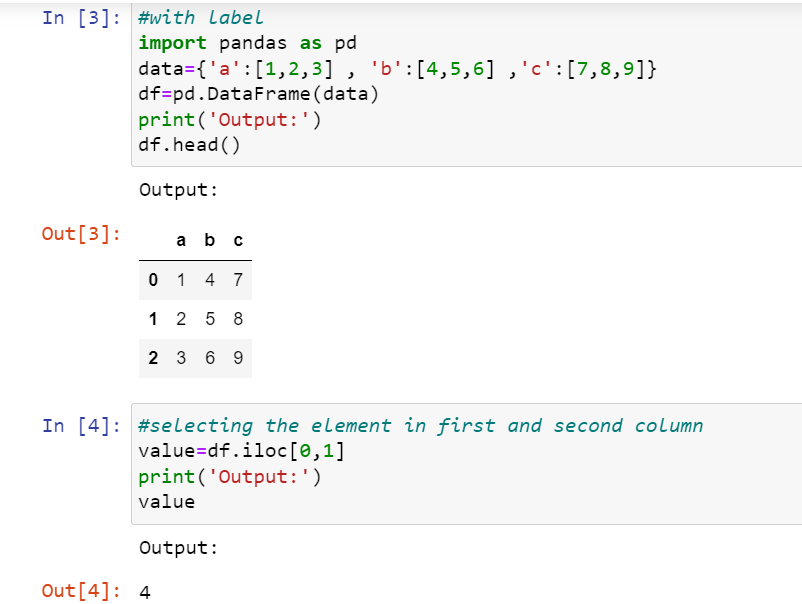
iloc is primarily integer-based indexing, where you can use integer values to select specific rows and columns.
It takes two integer arguments: the first one represents the row indices, and the second one represents the column indices.
The syntax is DataFrame.iloc[row_index, column_index].
Example: with an index
loc (label-based indexing):
loc is primarily label-based indexing, where you can use labels (row and column names) to select specific rows and columns. It takes two label arguments: the first one represents the row labels, and the second one represents the column labels.
The syntax is DataFrame.loc[row_label, column_label].
Example: with index label

In summary, iloc is used for selecting data by integer indices, while loc is used for selecting data by labels. Understanding the distinction between these two methods is important for precise data manipulation in pandas dataframes.
Pandas difference between loc[] vs iloc[]
loc function | Iloc function |
Select rows and columns by labels | Select rows and columns by integer positions |
Slicing with labels | Slicing with integer positions |
Use Boolean arrays | Does not uses Boolean arrays |
Label-based indexing | Position based indexing |
Syntax : Dataframe.loc[specific rows, specific columns] | Syntax : Dataframe.iloc[row_index_value, column_index_value] |
Example: df.loc[2, ‘Salary’] df.loc[df[‘Department’] == ‘Marketing’, [‘Name’, ‘Salary’]] | Example: df.iloc[2, 2] df.iloc[1:3, :2] |
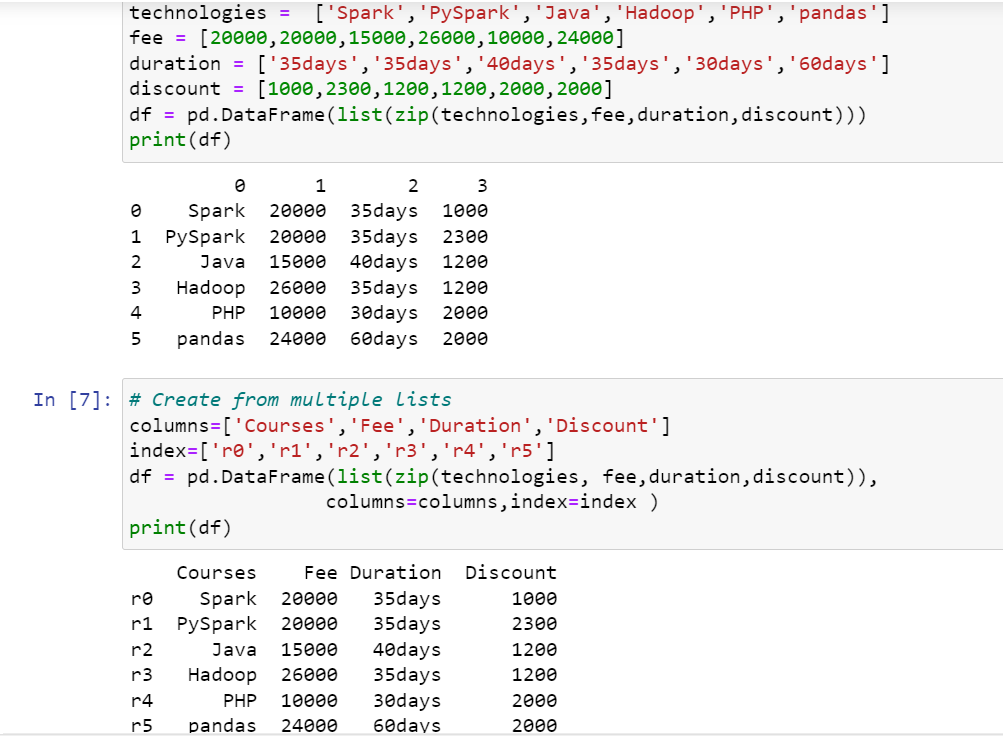
Creating a dataframe from a list involves using libraries like pandas in python. Here are the general steps to form a dataframe from a list. This will produce a dataframe like the following. Here, I have taken a technologies dataset in which it produces the analyses based on courses , fees, durations, discounts for each person pursuing in technology.Now,lets explore the code:
# Pandas.DataFrame .loc[] and .iloc[] usage import pandas as pd
Using Pandas:
- Import pandas: Start by importing the pandas library.
- Create a list: Generate or have a list of data ready that you want to convert into a dataframe.
- Convert the list to a dataframe: Use the pandas dataframe() function to convert the list into a df = pd.dataframe(data_list)
- Optionally,you can specify column names and indices by passing them as an argument.
The above steps outline the basic process of creating a dataframe from a list using pandas in python.
After creating a dataframe, we shall now apply .loc and .iloc features in the same example. As well as, let’s see the differences and similarities between loc[] vs iloc[] by using the below topics with examples. Here,.iloc uses numbers similar to slicing lists while .loc uses the labels associated with indexes and columns similar to accessing elements in a dictionary.
- Select single value
- Select multiple values
- Select range of values
- Select alternate rows & columns
- Using conditions
Select single value using loc[] vs iloc[]
By using loc[] and iloc[] you can select the single row and column by name and index respectively. The below example demonstrates how to select row by label and index.

CODE EXPLANATION:
1. df.loc[‘r2’] and df.iloc[1] both retrieve a row from a dataframe in Pandas, but they use different indexing methods:
2. df.loc[‘r2’]:
This code uses label-based indexing to select the row labeled ‘r2’.
It assumes that ‘r2’ is the index label of a row in the dataframe.
The loc accessor is used to access rows or columns by labels.
If df is a dataframe with rows labeled ‘r1’, ‘r2’, and ‘r3’, the df.loc[‘r2’] line would retrieve the row labeled ‘r2’.
3. df.iloc[1]:
This code uses integer-based indexing to select the row at index position 1 (remember that Python uses 0-based indexing).
It selects the row by its numerical position, regardless of the actual row labels.
If df is a dataframe without specified index labels, the df.iloc[1] line would retrieve the second row (index position 1).
Select multiple rows/columns using loc[] vs iloc[]
To select multiple rows and columns, use the labels or integer index as a list to loc[] and iloc[] attributes. Below is an example of how to select rows by label and index.
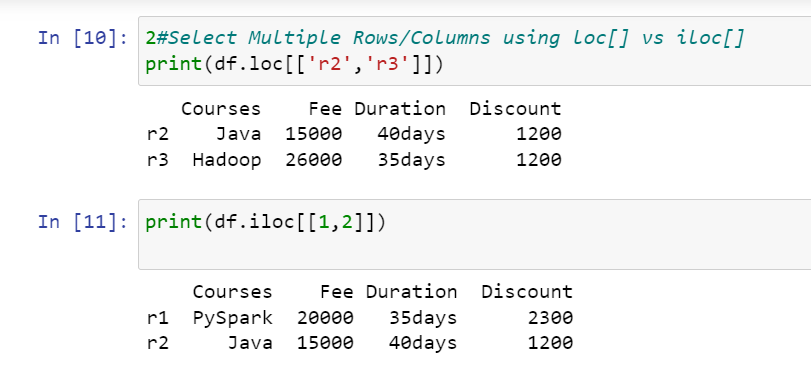
CODE EXPLANATION:
These code snippets demonstrate how to select specific rows from a Pandas dataframe using different indexing methods:
1. df.loc[[‘r2’, ‘r3’]]:
This code utilizes label-based indexing (loc) to select rows with labels ‘r2’ and ‘r3’.
[‘r2’, ‘r3’] inside the loc function specifies the list of row labels to be selected.
It retrieves rows with index labels ‘r2’ and ‘r3’from the df.
2. df.iloc[[1, 2]]:
This code utilizes integer-based indexing (iloc)to select rows based on their positional indices.
[1, 2] inside the iloc function specifies the list of integer positions of the rows to be selected.
It retrieves rows at index positions 1 and 2(remember, indexing starts at 0) from the df.
Select range of values between two rows or columns
By using loc[] and iloc[], you can also select rows and columns by range. For example all items between two rows/columns. all items starting from e.t.c. The below example selects rows in between r1 and r4 row indices.

CODE EXPLANATION:
1. df.loc[‘r2’] and df.iloc[1] both retrieve a row from a dataframe in Pandas, but they use different indexing methods:
2. df.loc[‘r2’]:
This code uses label-based indexing to select the row labeled ‘r2’.
It assumes that ‘r2’ is the index label of a row in the dataframe.
The loc accessor is used to access rows or columns by labels. If df is a dataframe with rows labeled ‘r1’, ‘r2’, and ‘r3’, the df.loc[‘r2’] line would retrieve the row labeled ‘r2’.
3. df.iloc[1]:
This code uses integer-based indexing to select the row at index position 1(remember that Python uses 0-based indexing). It selects the row by its numerical position, regardless of the actual row labels.
If df is a dataframe without specified index labels, the df.iloc[1] line would retrieve the second row (index position 1).
Select Alternate Rows or Columns
Similarly, by using ranges you can also select every alternate row from dataframe.

CODE EXPLANATION:
Let’s break down the provided code snippets:
1. df.loc[‘r1′:’r4’:2]:
df.loc[‘r1′:’r4’:2] uses label-based indexing (loc) to select rows from ‘r1’ to ‘r4’ with a step size of 2.
‘r1′:’r4’ specifies the range of row labels from ‘r1’ to ‘r4’ inclusively.
2 as the third parameter signifies the step size, meaning it selects every second row within the specified range.
Therefore, this code snippet will print rows labeled ‘r1’, ‘r3’ (since the step size is 2).
2. df.iloc[0:4:2]:
df.iloc[0:4:2] uses integer-based indexing (iloc) to select rows based on their positions.
0:4:2 specifies the range of row positions from 0 to 4 (exclusive) with a step size of 2.
0:4 defines the range from position 0 to position 3, and 2 as the step selects every second row within this range.
Therefore, this code snippet will print rows at positions 0(the first row) and 2(the third row).
Using Conditions with loc[] vs iloc[]
By using loc[] and iloc[] you can also select rows by conditions from pandas dataframe.

CODE EXPLANATION:
The code snippets provided use Pandas dataframe indexing and conditional selection to filter rows based on a specific condition.
1. df.loc[df[‘Fee’] >= 24000]:
This code selects rows from the df where the value in the ‘Fee’ column is greater than or equal to 24000.
df[‘Fee’] >= 24000creates a boolean mask that evaluates to True for rows where the ‘Fee’ column value is greater than or equal to 24000 and ‘False’ otherwise.
df.loc[df[‘Fee’] >= 24000]filters the dataframe using this boolean mask, retrieving rows where the condition is True.
print() is then used to display the filtered rows.
2. df.iloc[list(df[‘Fee’] >= 24000)]:
This code does something similar but uses a different approach to achieve the same result.
df[‘Fee’] >= 24000creates the same boolean mask as before.
list(df[‘Fee’] >= 24000)converts the boolean mask into a Python list of True and False values.
df.iloc[…]uses integer-based indexing (iloc) to select rows based on their positions. However, it requires the boolean mask to be converted into a list because iloc expects indices as integers.
print() is used to display the filtered rows retrieved by df.iloc[…].
Both code snippets aim to filter the dataframe rows based on the condition where the ‘Fee’ column values are greater than or equal to 24000. The first code snippet (df.loc) uses label-based indexing and directly filters the rows using the boolean mask, while the second snippet (df.iloc) converts the boolean mask to a list and uses integer-based indexing to achieve the same result.
Advantages of loc
Here are a few advantages of loc.
- Allowed in cases like labeled-based indexing. It is easy to read and understand.
- It can be used with Boolean arrays to solve problems.
- Can be used on both single and multiple indexes.
Disadvantages of loc
Some of the disadvantages of loc are as follows:
- It can be low with large dataframes.
- It uses unique indexes, but it may sometimes be different
Advantages of iloc
Some of the advantages of iloc are as follows:
- Allowed in cases like integer-based indexing.
- More effective for large dataframes.
- It uses integer arrays to solve complex problems.
- Can be used on both single and multiple indexes.
Disadvantages of iloc
Some of the disadvantages of iloc are as follows:
- It’s hard to read and understand for new users.
- It can create problems if not updated regularly and lead to data misinterpretation.
So we can say that it depends on the uses’ needs. But in general, ‘loc’ is used for label-based indexing, and ‘iloc’ is used for integer-based indexing.
Conclusion
In this article, you have learned the loc and iloc in pandas dataframe using examples. DataFrame.loc[] is label-based to select rows and/or columns in pandas. It accepts single label, multiple labels from the list, by a range (between two indexes labels), and many more. DataFrame.iloc[] is index-based to select rows and/or columns in pandas. it accepts a single index, multiple indexes from the list, indexes by a range, and many more.